

Sales teams waste hours each week on repetitive admin work logging calls, updating records, chasing down follow-ups while deals stall and buyers go cold. The fix isn’t hiring more reps or working longer hours. It’s using your CRM to automate the busywork so your team can focus on what closes deals. Plus, 78% of sales professionals think their CRM is effective in boosting sales and marketing efforts, yet another bonus to using a trustworthy platform.
Continue reading to learn how to prioritize high-impact automations, set up clean data capture, define pipeline stages that trigger the right actions, and configure rules that scale without creating chaos.
What Should Your CRM Automate First?
Start with automations that save time and move deals forward. Prioritize based on hours saved per week and proximity to revenue. If an automation won’t save at least 30 minutes weekly or help advance a deal to the next stage, defer it.
Map your current sales motion to identify the highest-impact opportunities:
- Lead routing and SLA alerts for prompt response
- Data enrichment and deduplication on capture for better targeting
- Auto-creation of follow-up tasks after meetings or form fills
- Email and SMS touchpoints tied to deal stage or inactivity thresholds
Pro Tip
Rank each candidate by hours saved per week and proximity to revenue.
Unfocused automation creates more problems than it solves. Irrelevant alerts desensitize reps, broken handoffs frustrate customers, and fragmented rules force ops to intervene manually.
When you sequence automations strategically, reps engage leads faster, managers coach more effectively, and leaders forecast more confidently.
How Do You Set Up Clean Data Capture?
Clean data is the foundation of reliable automation. When data comes in consistently, your automation rules can be simple and predictable. You can route leads with confidence, personalize emails accurately, and trigger the right follow-up every time.
To implement forms, ensure you unify all data entry points, like web forms, email integrations, and calendar sync, so they map to consistent fields in your CRM.
- Why It Matters: Standard naming conventions and picklists prevent rogue data from entering your system and breaking downstream automation.
In terms of mobile CRM for data capture, empower your reps to log notes, update records, and scan business cards on the go so the CRM stays current between meetings.
- Why It Matters: Real-time updates prevent data gaps that cause routing errors and irrelevant triggers.
Pro Tip
Stick to 3–5 must-have fields (next step, close date, decision maker status) and hide the rest.
Without clean data capture, reps fall back on spreadsheets and shadow systems. Invest in solid inputs from day one and the rest of your automations will run smoothly.
How Should You Define Pipeline Stages?
Pipeline stages determine when automations fire. If your stages are vague or out of sync with your actual sales process, automations will trigger at the wrong time.
For instance, a rep moves a deal to “Proposal,” and your CRM automatically sends a pricing email—except the rep hasn’t sent the proposal yet. Now you’ve got a confused buyer, a frustrated rep, and a deal at risk.
Define clear, buyer-centric pipeline stages from the start. Each stage should represent a meaningful moment in the buyer’s journey, not just a rep’s activity.
Here’s a sample stage map to use as a template for your own:
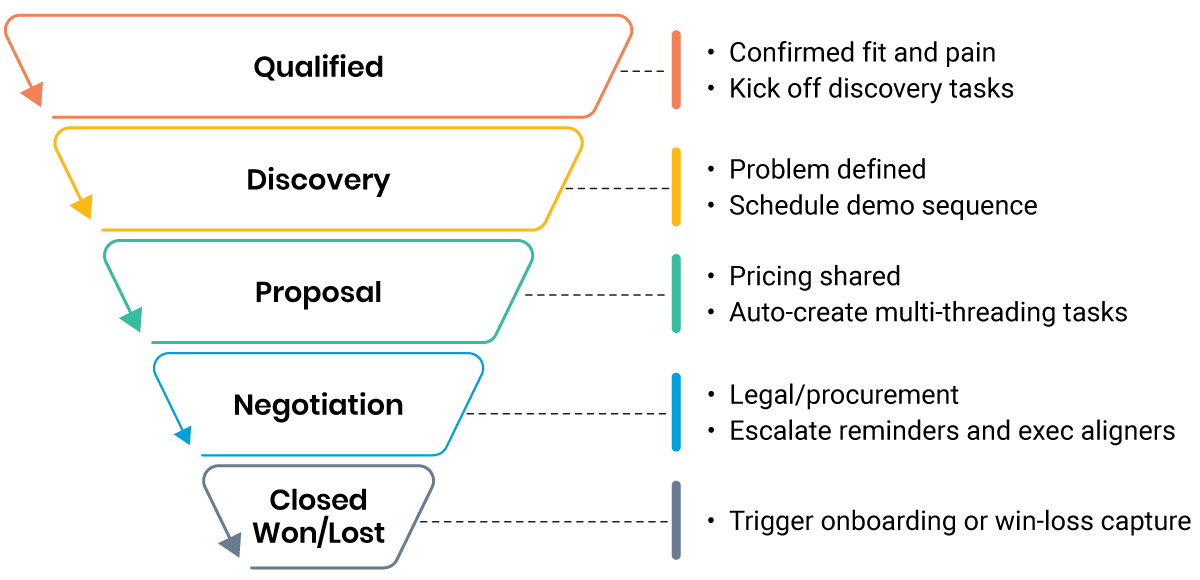
Additionally, you should define 1–2 observable moments that qualify a deal to enter each stage and what must happen for it to advance.
Pro Tip
Tie at least one automation to leaving each stage, like creating a task, sending a notification, or updating a field, to maintain momentum.
Squishy stages lead to squishy automations, so make sure to document criteria to keep everyone on your team aligned and automation in sync.
How Do You Configure CRM Automation Rules?
Most CRMs make it easy to build workflow rules. A few clicks and you can route leads, trigger notifications, kick off sequences, and update records. But without organization, you end up with leads bouncing between owners, reps bombarded with alerts, and contacts receiving redundant emails.
Only alert reps and managers of truly actionable events, like a decision maker opening a proposal or a high-value deal stalling too long in a stage. To ensure the right information goes to the right rep, build rules that account for all influencing factors, including:
- Territory
- Product fit
- Rep capacity
- Lead source
Comprehensive routing prevents leads from falling through the cracks or landing with the wrong rep.
How to Implement Nurture and Follow-Up Sequences
Below are some ways you can create consistent, timely touchpoints that align with each pipeline stage and buyer persona:
- Build nurture and follow-up sequences that pause or stop automatically based on reply, stage change, or other disqualifying events.
- Develop a standard naming convention for each rule using Owner-Intent-Trigger (e.g., “Smith-RouteLeads-StatusChange”).
- Store rules in a centralized repository and document any dependencies or conflicts.
Pro Tip
Version every rule name with Owner-Intent-Trigger to make dependencies visible and troubleshooting faster.
When automation rules pile up without a plan, leads get lost, contacts feel spammed, and reps lose faith in the system. But when you map out rules thoughtfully and keep them neatly organized, automation becomes a true sales multiplier.
How to Automate Activity Scheduling That Sells
Manual task creation burns time and creates inconsistency, so automating activity scheduling ensures every deal gets the attention it needs, when it needs it, without reps having to remember or managers having to chase.
Trigger tasks automatically based on deal stage, inactivity thresholds, or buyer signals:
- Discovery call scheduled: Create pre-call research task
- Proposal sent: Create 2-day follow-up task
- Deal inactive 7 days: Escalate to manager with outreach task
- Contract sent: Create daily check-in tasks until signed
Scheduling your automation activity is crucial. Without it, follow-ups depend on the individual rep, ending in mixed results, leads that go cold, and uneven buyer engagement.
Dashboards That Drive Accountability
Dashboards turn automation into visibility. When reps, managers, and leaders can see real-time pipeline health, activity completion, and deal velocity, they can course-correct before problems compound. Without role-specific dashboards, teams operate blind.
Here are some of the must-have widgets to include in your dashboard:
- Reps: My open tasks, deals by stage, deals inactive >5 days, this week’s closed revenue
- Managers: Team activity completion %, pipeline coverage by rep, average deal age by stage, forecast vs. actual
- Leaders: Win rate by source, velocity by stage, automation rule performance, data quality score
Where Do Teams Go Wrong?
Even well-intentioned automation efforts can backfire. Here are the most frequent pitfalls:
- Over-automating too soon: Layering complex rules before data and stages are clean creates compounding errors.
- Ignoring suppression logic: Contacts receive duplicate emails or tasks because rules don’t check for existing activity.
- Skipping documentation: Six months later, no one remembers why a rule exists or what it’s supposed to do.
- Automating broken processes: Automation makes bad processes faster, not better; fix the workflow first.
- Forgetting mobile: Rules that work on desktop fail on mobile, where reps spend most of their time.
Teams that skip these guardrails end up with automation debt, a tangled mess of conflicting rules that require constant manual intervention. Reps stop trusting the system, adoption drops, and ops teams spend more time firefighting than optimizing.
How Do You Drive Adoption and QA?
Automation only works if your team uses it. Even the most laser-focused rules fail if reps bypass the CRM or ignore automated tasks.
Drive adoption through clarity and accountability with these tips:
- Train on the “why”: Show reps how automation saves them time and helps them close more deals.
- Make it easy: Simplify data entry, optimize for mobile, and eliminate unnecessary fields.
- Monitor compliance: Track CRM activity completion rates and address gaps in 1:1s.
- Celebrate wins: Highlight reps who use automation effectively and share their results
Follow these steps to make a quality assurance (QA) check quarterly:
- Test each rule end-to-end to confirm it fires correctly
- Review error logs and fix broken integrations
- Retire rules that no longer save time or move deals
- Update stages and criteria as your sales motion evolves
To fully adopt automation, everyone needs to be on board. Without QA, broken rules create silent failures: leads don’t get routed, tasks don’t get created, and deals slip through the cracks.
Conclusion
CRM automation isn’t a one-time project. It’s an ongoing discipline that compounds over time. The technology to automate your sales process already exists in most modern CRMs, so you don’t need to buy new tools or overhaul your system. With strategic planning and disciplined execution, you can turn the CRM you already have into a selling machine that lets reps be reps and helps managers bring out their best.
When your CRM is powered by reliable data, your automations work the way they’re supposed to—routing leads correctly, triggering the right follow-ups, and giving your team the visibility they need to close more deals. Start automating today with Salesgenie®.
FAQs
Start with automations that save at least 30 minutes per week and directly advance deals, such as lead routing with SLA alerts, data enrichment on capture, auto-creation of follow-up tasks after key events, and stage-based email touchpoints. Rank each opportunity by hours saved and proximity to revenue generation.
Unify all data entry points using consistent field mapping and naming conventions across web forms, email integrations, and mobile CRM tools. Require only 3-5 essential fields for mobile updates to encourage consistent use while maintaining data quality.
Define buyer-centric stages that represent meaningful moments in the customer journey rather than just sales activities. Each stage should have clear entry and exit criteria based on observable buyer actions, such as confirming fit for “Qualified” or sharing pricing feedback to exit “Proposal.”
Use a standard naming convention like “Object-Trigger-Action” and build rules with intention, starting with high-impact items like lead routing and selective notifications. Document dependencies in a centralized repository and configure suppression rules to prevent overlapping sequences.
Well-implemented automation frees reps from administrative tasks to focus on selling, enables managers to coach strategically instead of chasing updates, and creates consistent follow-up without burning out the team. This results in faster response times, cleaner pipelines, and real-time visibility into performance.