
Key Takeaways
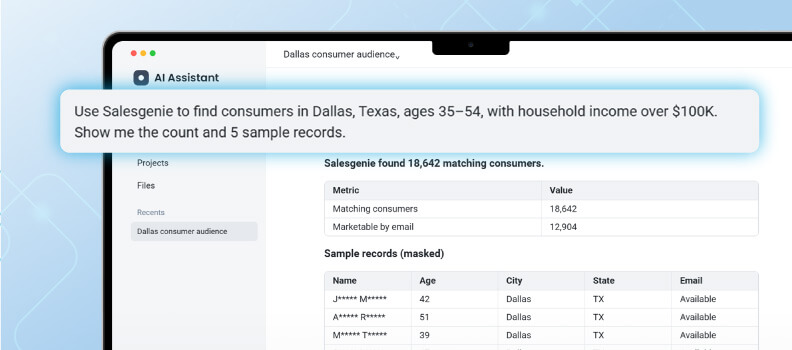
- What you get: Prospect lists built from verified records, without leaving the Claude or ChatGPT conversation where you already plan your outreach. Describe who you want to reach, and you see a count and sample records before you spend anything.
- Who benefits: Owner-operators, small sales and marketing teams, and agencies who research and write in an AI assistant every week, and who need prospect data they do not have to double-check.
- How it works: Salesgenie MCP connects Claude and ChatGPT to Salesgenie business and consumer data. You can buy a list in Salesgenie with no subscription required, or enrich your own customer files on a paid plan.
An AI tool can sketch a campaign, rewrite your offer, and draft three versions of a cold email—all before your first cup of coffee is finished.
But when you ask it to send those emails to 200 dental practices in Austin, your AI tool will most likely hand you a tidy list of names, phone numbers, and addresses that you have no way to verify. That’s the gap in AI for lead generation today: the reasoning is great, but the assistant has no real data to reason over.
Starting today, that changes. Salesgenie® is launching the Salesgenie MCP (Model Context Protocol), which brings Salesgenie’s verified business and consumer records directly into Claude and ChatGPT—so the assistant you already trust with your ideas can finally build lists you can trust, too.
Why Can’t Your AI Assistant Build a Prospect List?
Before you look at what’s new, it helps to know exactly where general-purpose assistants fall short. The problem isn’t intelligence. It’s access.
On its own, ChatGPT or Claude can do the thinking work well. It can help you define an ideal customer profile (ICP), suggest which industries and company sizes to target, and tell you which filters make sense.
What it can’t do is look those businesses up, because it has no licensed, verified prospect database to pull from. Ask it for real contacts, and the best you’ll get is a small batch of business information of unverifiable quality.
Worse, language models are fluent even when they’re wrong. In a study in Scientific Reports, researchers found that 55 percent of the citations GPT-3.5 produced and 18 percent of those from GPT-4 were fabricated—references that looked real but didn’t exist.
While that study measured academic citations, not contact data, the lesson still applies: when an AI doesn’t have a source, it can produce something that only looks like one.
So what does that cost you? Wasted outreach. Returned mail. Dead phone numbers. Hours spent checking records you were supposed to be calling.
Fast answers don’t mean anything when they’re inaccurate.
Meet the Salesgenie MCP Server
The Salesgenie MCP server connects Claude and ChatGPT to Salesgenie’s verified business and consumer data. You describe who you want to reach in plain language, and your assistant returns a count and sample records drawn from real Salesgenie records—then gives you a checkout link to buy the list in Salesgenie.
MCP stands for Model Context Protocol, an open standard Anthropic introduced in 2024 as “a new standard for connecting AI assistants to the systems where data lives.” In other words, it’s the plug that lets your AI assistant talk to a real database instead of guessing.
Salesgenie MCP gives your assistant three tools:
- Business Search to find companies by industry, size, sales volume, and location
- Consumer Search to find households by location, age, and income
- Enrichment to fill in the gaps in your own customer or prospect files
The result is a simple division of labor. Your assistant helps you figure out who to target. Salesgenie’s business and consumer data supplies the records that match. Or, as we put it: lead lists built on real records, at the speed of conversation.
It’s built for businesses with 1 to 50 employees that use Claude or ChatGPT for work at least weekly—including agencies and franchise marketing teams running prospecting across several clients or locations.
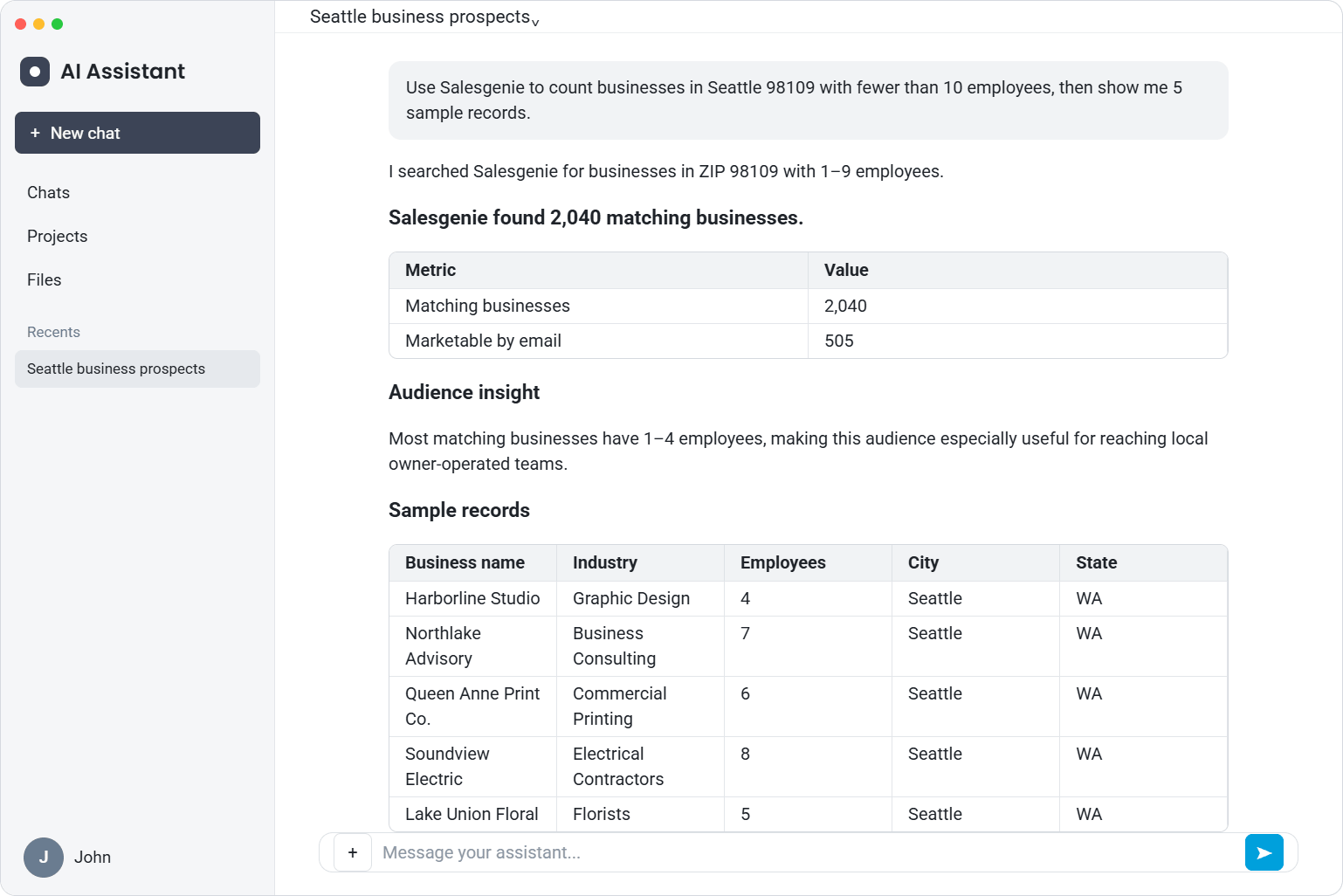
Build Prospect Lists With Salesgenie MCP
The biggest change is how little effort it takes to go from “I think I should target…” to an actual list. No filter menus. No switching tabs. You describe the audience the way you’d describe it to a colleague.
Start by working out your target with the assistant. Not sure who to go after for a new offer? Ask. Once you have a direction, tell Salesgenie to find it in the same conversation.
For business prospect data, you can search by business name, street address, city, state, industry (using four-digit SIC codes), employee size, sales volume, or proximity to a geographic point. For consumer data, you can search by name, street address, city, state, age, or income.
Salesgenie returns the total number of matching records and a set of sample records, right in the chat. Your assistant can add its own read on the list, too. Then you keep refining with plain follow-ups like “Only businesses with 20 or more employees” or “Change the city to Tacoma.”
Why does this matter for a small team? Because your targeting changes as your business changes. You test a new market, adjust an offer, or pick up a new client, and you need a fresh list—today, not after an afternoon in a database.
Pro Tip
Ask your assistant to name the Salesgenie criteria it used for each search. You’ll catch a mismatched filter before you rely on the list.
How AI Assistants Change Lead Generation With Salesgenie
Speed is nice. Trust is the point. Your assistant brings the reasoning, and Salesgenie brings records that have actually been checked—which is what turns an AI conversation into a list you can put to work.
Salesgenie’s business data is built on active verification, not passive scraping. It covers 18.6 million-plus US businesses compiled from more than 4,000 sources, including government filings and business licenses, and it’s checked through human and AI review.
More than 300 data quality experts place over 25 million verification calls a year to confirm records, with a focus on owner-level verification so you reach real decision-makers. That depth is especially strong for small, local, and niche businesses—the restaurants, dental practices, and contractors that thin online profiles tend to miss.
Consumer data starts with real-world records of where people actually live: deeds, tax assessor data, utility new connects, and public records. It’s compiled from 100-plus sources, validated across those sources, and updated monthly, covering 310 million-plus US consumers.
A few more things worth knowing:
- Contact data is never modeled, so you’re getting real records, not estimates.
- Data Axle has been building business and consumer data for more than 50 years.
- Data Axle was named a Leader in The Forrester Wave™ for B2B Marketing and Sales Data Providers, Q1 2026, where Forrester cited its “exceptional account coverage within North America,” particularly for organizations targeting small and medium-sized businesses (SMBs).
Want to see how Salesgenie verifies its data? Better yet, check it yourself: sample records show up in your assistant before you buy anything.
| AI assistant alone | AI assistant with Salesgenie MCP | |
|---|---|---|
| Where records come from | No licensed prospect database | Salesgenie verified business and consumer data |
| Verification | None you can confirm | Business records: human and AI review plus 25M+ verification calls a year; consumer records: cross-validated and updated monthly |
| Audience size | Unknown | Total matching count returned in chat |
| Contact details | Unverifiable, sometimes invented | Real records; contact data never modeled |
| Getting the list | Copy and paste, then check everything | Preview samples, then buy in Salesgenie |
Use Salesgenie MCP in ChatGPT or Claude
If most of your planning, research, and writing already happens in ChatGPT or Claude, switching to another tool just to pull a list is friction you don’t need. Salesgenie MCP keeps the whole flow in one place.
You define the audience, preview the count and sample records, and request a checkout link without leaving the chat. Then you review pricing and complete the purchase in Salesgenie. If you’re already a Salesgenie user, it’s the same data you know—just available where the work happens.
The same goes for the customer files you already have. Maybe your list is missing phone numbers, addresses, or business details.
With data enrichment through Salesgenie MCP, you upload the file into your assistant, and Salesgenie matches your records against its data. You’ll see how many records matched and how many credits the request will use, and nothing runs until you confirm. Enriched records come back in the AI tool, ready to export.
A few rules to know: enrichment requires a paid Salesgenie plan, each record needs a name and full address to match, and requests are processed in batches of up to 100 records. You’re charged only for records that match, with one additional credit for each matched email.
Prefer to work inside Salesgenie itself? The Salesgenie Smart AI Suite includes Smart Audiences, which builds prospect lists right in the platform.
Pro Tip
Upload about 100 records at a time. It keeps Claude or ChatGPT from timing out mid-request.
What Can You Do With the Salesgenie MCP Server?
The easiest way to understand it is to see the requests. Here are a few you can copy straight into Claude or ChatGPT once you’re connected:
- “Show me dentists in Austin, Texas.”
- “Restaurants in Denver with 10 to 50 employees.”
- “Build a list of 500 law firms in California with 5 to 25 employees, then I’ll buy it.”
- “Households earning over $150K in Bellevue, WA.”
- “Enrich this lead list and tell me which have over 50 employees.”
Search requests come back with a count and sample records, purchase requests end with a checkout link, and enrichment requests return your file with new columns filled in. Results are still being refined, so expect them to keep improving.
Think about how that plays out in real work. An owner-operator expanding into a new city can size the market and pull a list in one conversation. An agency managing prospecting for several clients can build separate audiences without logging in and out of different tools. A team with a half-complete customer file can fill in the missing details and rank accounts by sales volume—all from the same chat.
How Do You Get Started?
Connecting takes a few manual steps at launch, because Salesgenie MCP connects through a custom URL rather than a directory listing. Here’s what you need: a Salesgenie account (you can create a free Salesgenie account if you don’t have one), Claude or ChatGPT on a free or paid plan, and the Salesgenie MCP URL: https://mcp.salesgenie.com/mcp
To connect Claude:
- Click your name in the bottom left, then click Settings.
- Click Connectors, then Add, then Add custom connector.
- Name it Salesgenie, paste the Salesgenie MCP URL, and click Continue, then Add.
- Click Connect and sign in with your Salesgenie username and password.
To connect ChatGPT:
- Click Plugins in the left menu, then Add, then Add custom MCP server.
- Name it Salesgenie, paste the URL into Connection, and leave Authentication as OAuth.
- Check “I understand and want to continue,” click Create as a plugin, then Continue to Salesgenie, and sign in.
ChatGPT shows a risk warning for all custom connectors that aren’t listed in its directory yet, so don’t be surprised when you see it. Once you’re connected, type @Salesgenie before your question in any chat.
Results can take up to a minute. If you get stuck, email [email protected] or call 866.872.6917.
When to use the Salesgenie platform: if your targeting depends on ZIP code, radius, homeowner status, or job titles, build the list in the Salesgenie platform, where those filters are available. Use Salesgenie MCP for searches by business name, address, city, state, industry, employee size, sales volume, proximity to a geographic point, age, or income.
Pro Tip
In Claude, set Salesgenie’s search tools to “Always allow” under Tool permissions so it doesn’t ask before every search.
FAQs
MCP (Model Context Protocol) is an open standard, introduced by Anthropic, that lets AI assistants connect to outside tools and data sources. You can read more in the official MCP documentation.
For sales teams, it matters because it lets your assistant query a real prospect database instead of guessing. With Salesgenie MCP, that database is Salesgenie’s verified business and consumer data.
Salesgenie MCP works with ChatGPT and Claude, on both free and paid plans. At launch, you connect through a custom URL, since Salesgenie isn’t listed in either assistant’s connector directory yet.
Connecting is free, and you don’t need a paid subscription to search or buy lists. With a free Salesgenie account, you can build audiences, review counts and partially masked sample records, and purchase lists one at a time at standard list pricing. Enrichment requires a paid plan and uses credits, and you’ll see the credit cost before you confirm.
You connect with your own Salesgenie username and password, and ChatGPT connects using OAuth sign-in. Enrichment never deducts credits until you’ve reviewed and confirmed the total, and Claude lets you control when Salesgenie’s tools can run through its tool permissions. For specific security questions, contact the Salesgenie team at [email protected].
The difference is the data underneath. Salesgenie business records are maintained through active verification—human and AI review plus more than 25 million verification calls a year—with deep coverage of small, local, and owner-operated businesses.
Consumer records come from real-world sources, such as deeds and utility connections, and are updated monthly. Contact data is never modeled. And you can buy one list at a time, with no subscription required.
Build Better Lists Without Leaving Your Chat
Your AI assistant is only as useful as the data it can reach. Without a real source, it can help you think about prospecting, but it can’t do the prospecting—and every hour you spend checking invented records is an hour you’re not selling.
Salesgenie MCP closes that gap by putting verified Salesgenie business and consumer records inside the Claude or ChatGPT conversations you’re already having, so you can describe your next customer, see who’s really out there, and act on it.
Create your free Salesgenie account and connect it to Claude or ChatGPT to build your next list from real records.