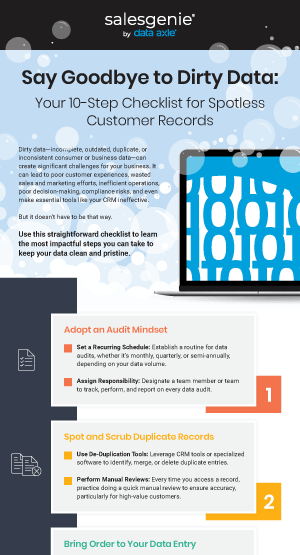

Dirty data—incomplete, outdated, duplicate, or inconsistent consumer or business data—can create significant challenges for your business. It can lead to poor customer experiences, wasted sales and marketing efforts, inefficient operations, poor decision-making, compliance risks, and even make essential tools like your CRM ineffective.
But it doesn’t have to be that way.
Use this straightforward checklist to learn the most impactful steps you can take to keep your data clean and pristine.
1. Adopt an Audit Mindset
- Set a Recurring Schedule: Establish a routine for data audits, whether it’s monthly, quarterly, or semi-annually, depending on your data volume.
- Assign Responsibility: Designate a team member or team to track, perform, and report on every data audit.
2. Spot and Scrub Duplicate Records
- Use De-Duplication Tools: Leverage CRM tools or specialized software to identify, merge, or delete duplicate entries.
- Perform Manual Reviews: Every time you access a record, practice doing a quick manual review to ensure accuracy, particularly for high-value customers.
3. Bring Order to Your Data Entry
- Create Data Entry Guidelines: Develop and enforce standardized rules and formats for data entry, such as consistent use of titles, phone number formatting, and address abbreviations.
- Automate Formatting: Take standardization efforts one step further by implementing tools that automatically enforce your standards during data entry, saving you hours of time and energy.
4. Keep Your Contacts in Check
- Perform Email Verification: Use email verification tools to identify and correct invalid or outdated email addresses. If you frequently add new contacts, send marketing emails often, or have a large list size, you should consider doing this more often.
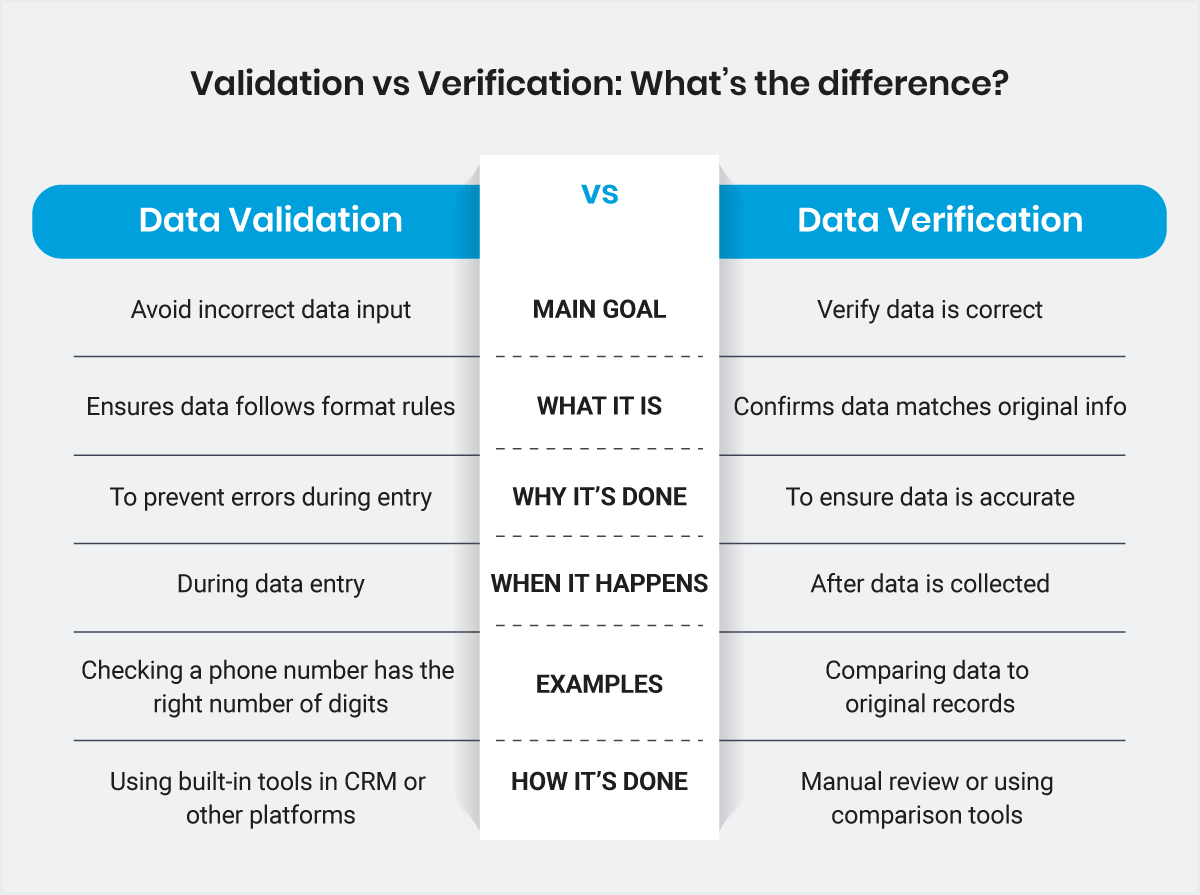
- Phone Number Validation: Regularly check and update phone numbers using automated validation tools or by calling contacts directly.
5. Stop Bad Data at the Source
- Automate Real-Time Validation: Use your CRM’s built-in tools or custom scripts to automate data validation for all new data entries. This helps reduce errors, streamline data entry, and improve overall data quality.
- Run Periodic Checks: If you don’t manually check data every time you access a record, schedule dedicated time to catch and correct issues by hand and ensure the automated validation works.
6. Refresh and Refine Customer Data
- Enrich Data: If necessary, enhance your customer profiles with additional data points such as job titles, company size, or industry, using third-party data providers.
- Customer Outreach: Periodically contact customers to confirm or update their contact information and preferences. Use this outreach to ask if your customer is facing new challenges or problems you can help address.
7. Clear Out Inactive Contacts
- Define Inactivity: Set criteria for what constitutes an inactive contact and enact the rules moving forward. Criteria you could implement may include if a customer hasn’t engaged with your brand in 12 months.
- Run Re-Engagement Campaigns: Before removing inactive contacts, it’s always a good idea to run a re-engagement campaign. This allows customers to update their information or confirm their interest.
8. Segment and Prioritize Like a Pro
- Create Segments: Organize your data into meaningful segments based on criteria like customer behavior, purchase history, or demographics.
- Prioritize Key Segments: Focus your cleaning efforts on high-value or frequently used segments to maximize impact.
9. Declutter Your Database
- Create a Retention Policy: Establish a data retention policy that defines how long you keep outdated data.
- Secure Archiving: Securely archive old data if it must be retained for legal or historical reasons or delete it if it’s no longer needed.
10. Turn Data Cleanliness into a Routine
- Create Documentation: Keep a detailed record of your data cleaning processes and any changes made to the database.
- Monitor Performance: Regularly review the effectiveness of your data cleaning efforts and adjust as needed.
Need help making clean data a reality at your business? We’re here to help!
We offer a comprehensive portfolio of data solutions, including enrichment, enhancement, and licensing. Our expert team will help you maintain the accuracy and relevance of your data, giving you the competitive edge you need to grow your business. Contact us today!