
There’s no doubt that search engine marketing (SEM) advertising is a crucial component of your overall advertising efforts, with recent reports stating that 84% of brands and marketers notice positive results from their paid ad campaigns. As a small business owner, you’re bombarded with a constant stream of SEM updates like new features, policies, and “best practices” announced every week. But here’s the reality: you can’t afford to react to every change. So how can you clearly and confidently find a way to decide which SEM updates truly matter?
Continue reading to learn why SEM changes so frequently, what factors actually force you to adapt, and how to spot the difference between a true revenue risk and a flashy update you can confidently ignore. You’ll walk away with a practical, repeatable way to evaluate any SEM update and make a clear decision to act or wait.
Why Does SEM Change So Often?
If you’ve been advertising on search engines for a while, you know firsthand how quickly things can change. There are a few key reasons why SEM platforms evolve so rapidly:
- User behavior drives constant adaptation. As searchers’ needs and preferences shift, platforms must deliver relevant results. The rise of voice search and mobile usage has forced platforms to rethink everything from keyword matching to ad formats.
- Platform economics matter. Search engines are businesses, and they’re always looking for ways to increase ad revenue and market share. This means regularly testing new features and policies that might attract more advertisers or encourage higher bids.
- Platforms update their systems frequently to improve ad quality and prevent abuse, including changes to how they detect low-quality ads or update policies around sensitive categories.
The key thing to remember is that all these changes are driven by the platforms’ own goals and priorities, not necessarily what’s best for your business. But once you understand the underlying reasons behind these updates, they start to become more predictable. You can spot patterns and anticipate changes before they happen, which helps you respond calmly and strategically.
Which SEM Updates Can Change Your Decisions?
With so many SEM updates happening constantly, it’s easy to fall into a reactive cycle of trying to chase every new feature or announcement. But that’s a quick way to burn through your budget and bandwidth without necessarily improving results.
Apply a simple decision filter: does this update actually force a change in how you manage and optimize your campaigns? There are three factors that should trigger an immediate response:
- Targeting and inventory availability: Does the update significantly change who you can reach with your ads, or the types of placements and keywords you can target?
- Measurement and bidding integrity: Will the update alter how your results are tracked and reported, or disrupt the inputs into your bidding strategies?
- Policy and compliance: Does the update introduce new restrictions on what kinds of ads or landing pages are allowed, or expand enforcement of existing policies?
Below, you’ll find some clear examples of changes you should keep an eye on:
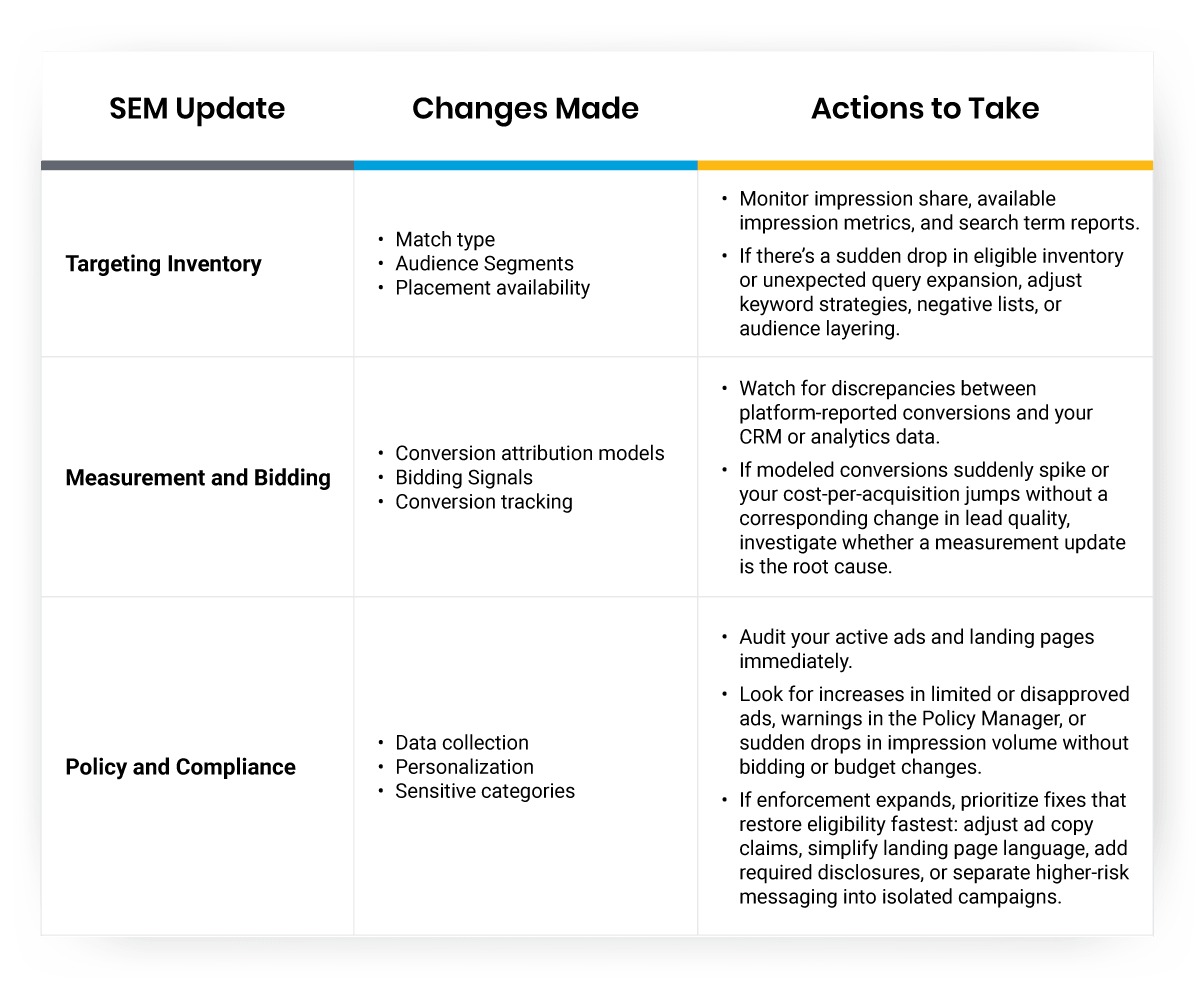
The bottom line? Spring into action when an update will materially affect your target audience, accurately measure and optimize your performance, or maintain compliance with ad policies.
How Do Google Ads Updates Impact Metrics?
It’s crucial to understand not just what is changing in Google Ads, but how those changes are likely to surface in your campaign metrics and reports. Different types of updates tend to impact different KPIs, depending on where they fall in the auction and reporting flow.
Ad Serving and Auctions
Changes to the following will usually show up first in core ad serving metrics like impressions, cost-per-click, impression share, and pacing:
- Keyword matching
- Available inventory
- Campaign budgets
- Competitor activity
If Google announces a broad match expansion and you see a sudden jump in cost per clicks (CPCs) without a corresponding spike in click-through rates (CTRs), that’s a strong signal the update is increasing competition, not that your ads are less relevant.
Measurement and Privacy
As Google adjusts audience targeting options, attribution models, and conversion modeling in response to privacy thresholds, the impacts appear downstream in:
- Cost-per-acquisition
- Return on ad spend
- Modeled conversion share
- Lead quality
Creative and format updates affect interaction and quality metrics like:
- CTR
- Conversion rate
- Quality Score components
Policy and compliance updates surface as:
- Ad eligibility status
- Policy disapprovals
- Account suspension (in severe cases)
Knowing which metrics to check first—and how quickly those indicators respond to changes—helps you isolate true causes faster and avoid chasing fluctuations that aren’t actually tied to the update you’re assessing.
When Should You Ignore SEM Updates?
Not every SEM update deserves your attention. In fact, most don’t. The key is recognizing which changes you can safely monitor from the sidelines without risking performance or compliance.
Here’s when you can disregard SEM updates:
- When optional features, cosmetic interface changes, or recommendations that don’t align with your campaign structure are introduced. New ad extensions, beta formats, or campaign setup flows might be interesting, but they won’t break your program if you don’t adopt them immediately.
- When updates don’t affect your specific account setup. If Google announces a change to Smart Shopping campaigns but you’re running standard Shopping campaigns, there’s no immediate action required. Similarly, if an update targets a geographic market or industry vertical you don’t serve, it’s not relevant to your decision-making.
Pro Tip
Always separate platform-wide announcements from what you’re actually seeing in your own account metrics. Just because Google or Microsoft says something is changing doesn’t mean you’ll see an impact right away or at all. If you can’t spot the effects of an update in your own performance data, it’s probably not urgent for your business.
Should You Prioritize Updates for Your Small Business Differently?
Small businesses face unique constraints when managing SEM: limited budgets, smaller teams, and competing priorities that pull focus away from paid search. This means your update triage process needs to be even more selective. Tackle SEM updates in relation to your small business by implementing the following:

Prioritize updates that protect your ability to generate leads or sales cost-effectively
If a measurement change threatens your ability to track conversions accurately, that’s a must-fix. If a policy update could result in ad disapprovals or account suspension, address it immediately. But if an update promises incremental efficiency gains or access to a new beta feature, it can wait until you have bandwidth.
Lean on automation more strategically
When Google introduces new Smart Bidding options or automated campaign types, evaluate whether they can reduce your manual workload without sacrificing control. The goal isn’t to adopt every automation—it’s to free up time for the optimizations that require human judgment.
Don’t let FOMO drive your decisions
Larger advertisers with dedicated SEM teams can afford to test every new feature. You can’t. Focus on the updates that directly impact your core revenue drivers and let the rest of the industry beta-test the nice-to-haves.
Act Now or Wait: Decision Signals
When an SEM update lands, how do you decide whether to act immediately or monitor and wait? Use this clear update triage process to guide your response.
Ask yourself these questions:
- Does this update directly affect my targeting, measurement, or compliance abilities?
- Is there a mandatory action or deadline I can’t afford to miss?
- What’s the real risk of waiting to implement—and what’s the opportunity cost of moving too soon?
Pro Tip
If the update includes a hard deadline or deprecates a feature you’re actively using, act quickly. If it’s optional or affects a feature you don’t use, add it to your backlog for later review. If the impact is unclear, monitor your metrics for one to two weeks before making changes. Look for unexpected shifts in CPC, impression share, conversion rates, or lead quality that coincide with the update’s rollout.
Your goal should be to move decisively when necessary and avoid premature optimization when you can afford to wait. Let your business objectives, not Google’s release calendar, dictate your optimization roadmap.
How to Stay Ahead Without Burnout
Staying current with SEM updates doesn’t require obsessive monitoring or constant campaign overhauls. It requires a sustainable system that filters signal from noise and focuses your energy where it counts.
Here are three best practices you can easily implement:
- Set up a weekly review routine. Dedicate 30 minutes each week to scan official platform blogs, industry newsletters, and your account notifications for updates. Flag anything that touches targeting, measurement, or compliance for deeper review. Archive the rest.
- Build a decision checklist based on the factors outlined in this article. When you encounter an update, run it through your filter: does it affect reach, tracking, or compliance? Is there a deadline? What’s the risk of waiting? Document your decision and move on.
- Create a backlog for low-priority updates. Just because an update isn’t urgent doesn’t mean it’s irrelevant forever. Revisit your backlog quarterly to identify opportunities you can implement during slower periods. This ensures nothing slips through the cracks while keeping your day-to-day focus on high-impact work.
How to Build Confidence with Post-Update Review
After you implement a change in response to an SEM update, don’t assume it worked as intended. Instead, you should:
- Build a post-update review into your workflow to confirm the change delivered the expected impact and didn’t introduce unintended consequences.
- Set a calendar reminder for one to two weeks after implementation and review the same metrics you monitored before the change: impressions, CPC, CTR, conversion rate, cost per acquisition (CPA), and lead quality.
- Compare performance to your pre-update baseline and look for meaningful shifts.
- If the update improved performance or stabilized a declining metric, document the win and move on.
- If performance worsened or stayed flat, investigate whether the update caused the issue or whether other factors are at play.
Pro Tip
Don’t be afraid to roll back a change if it’s not delivering value.
This feedback loop builds confidence over time. You’ll learn which types of updates tend to matter for your specific campaigns, and which ones you can safely ignore. That institutional knowledge makes future triage decisions faster and more accurate.
Conclusion
The constant stream of SEM updates can feel overwhelming, but you don’t have to react to every change. By focusing on updates that directly affect your targeting, measurement, or compliance, you can protect your performance without burning out. Apply the decision filter outlined in this article, monitor your metrics for real impact, and act decisively only when necessary.
When you need accurate, verified data to sharpen your targeting and de-risk SEM decisions, business and consumer data from Salesgenie® can help you reach the right audience with confidence.
Try Salesgenie today to see how verified business and consumer data can influence your SEM-related decisions.
FAQs
SEM platforms evolve rapidly due to three main factors: changing user behavior (like voice search and mobile usage), platform economics (seeking increased ad revenue), and quality improvements to prevent abuse. These changes are driven by the platforms’ own goals, not necessarily what’s best for individual advertisers.
Only three types of updates demand immediate response: changes to targeting and inventory availability, alterations to measurement and bidding integrity, and new policy or compliance requirements. If an update doesn’t affect your ability to reach audiences, measure performance, or maintain compliance, you can safely monitor it without rushing to implement.
Different updates impact specific metrics: ad serving changes affect impressions and CPC, creative updates influence CTR and quality score, audience changes impact CPA and return on ad spend (ROAS), while policy updates cause ad disapprovals or eligibility issues. Focus on the metrics most relevant to the type of update announced.
No, you should prioritize based on profitable scale and actual performance impact rather than excitement over new features. Keep your highest-performing campaigns stable while testing new features around the edges, and let your business objectives, not Google’s release calendar, guide your optimization roadmap.
Ask three key questions: Does this update directly affect targeting, measurement, or compliance? Is there a mandatory deadline I can’t miss? What’s the real risk of waiting versus the opportunity cost of acting too soon? Focus your energy on changes that protect core revenue drivers and move the business needle.