

If your goal is to build a scalable, repeatable B2B sales engine, your CRM should be at the center of that effort. The right platform helps your team stay organized, move deals forward, and create a clear line of sight from lead to close.
For B2B sales teams, the stakes are higher and the cycles longer. You’re managing multiple stakeholders, longer timelines, and high-value contracts. That’s where a CRM goes beyond basic contact tracking. The right solution can streamline workflows, automate repetitive tasks, surface real-time pipeline insights, and help your reps focus on reducing friction.
What makes a CRM B2B-ready?
Not all CRM systems are built the same. Some are designed for B2C companies with quick, transactional cycles. A B2B CRM is optimized for complex sales—supporting account-based strategies, multiple decision-makers, detailed forecasting, and integrations with marketing automation, quoting tools, and your broader tech stack.
Looking for a platform built for B2B success? This guide explores the top CRM platforms on the market in 2026, including what they offer, how they compare, and how to choose the best fit for your sales team.
What Makes a CRM Ideal for B2B Sales?
Every sales team has its own process, but the best CRM for sales should adapt to how your team works.
In B2B environments, that means handling more than just contact management. Your CRM should track every conversation across buying committees, help reps stay on top of long, multi-touch sales cycles, and give leadership accurate forecasts they can act on.
Here’s what to look for:
- Multi-contact visibility: Track all stakeholders on an account and maintain a single shared record across touchpoints.
- Custom pipelines: Align CRM stages with your sales methodology, from lead qualification to close.
- Automated workflows: Reduce manual follow-up and keep deals moving with triggered tasks, alerts, and reminders.
- Advanced reporting: Monitor team activity, deal velocity, stage conversion, and forecast accuracy at a glance.
- AI-powered insights: Prioritize outreach with lead scoring, next-best actions, and real-time opportunity analysis.
- Mobile access: Give your field reps everything they need, from notes to follow-ups, right from their phone.
- Flexible integrations: Plug into your marketing automation, quoting tools, finance systems, and platforms like Data Axle.
Pro Tip
Start by mapping your current sales process, then identify which CRM features will support, streamline, or scale that process.
Ready to compare platforms? Next, we’ll cover the key evaluation criteria to help you choose a solution that fits your business, team, and tech stack.
Which Evaluation Criteria Should You Look At (Before You Buy)?
Not all CRMs are built for the way B2B teams sell. Before you commit to a platform, it’s worth slowing down to evaluate how well it supports your unique workflows, tech ecosystem, and long-term goals.
Whether you’re evaluating one of the top CRM companies or testing a lesser-known contender, here are six key areas to focus on:
- Ease of Use & Onboarding: Even the most powerful CRM won’t help if your team avoids it. Look for a platform that reps want to use with features such as clean design, intuitive navigation, and minimal clicks to complete common tasks. Bonus points for built-in training guides, a responsive support team, and fast time-to-value for new users.
- Ask: How long does it take to get a new rep up and running? Are there tools in place to support change management?
- Scalability & Customization: As your team grows, your CRM should scale with it. That means flexible pipelines, custom fields, territory assignments, and permissions that match your org chart and selling strategy. Avoid rigid systems that require dev work every time your process changes.
- Ask: Can we model our exact sales stages, or are we limited to predefined templates?
- Integration & Automation: A CRM isn’t an island. It should play nicely with the rest of your tech stack. Evaluate how well it connects with your marketing automation tools, email and calendar, quoting system, ERP, and platforms like Data Axle. Built-in automation can also save hours of manual work with lead routing, task creation, and follow-up reminders.
- Ask: What integrations are native? What requires middleware? How easy is it to set up automated workflows?
- Artificial Intelligence (AI), Analytics, & Forecasting: Look for platforms that go beyond static reports. Many of the best CRMs 2026 include AI-driven forecasting, pipeline health scoring, and next-best-action recommendations. These features give sales leaders a clearer view of what’s moving, what’s stuck, and what needs attention.
- Ask: What kind of insights does the system surface automatically? Can we build custom dashboards tied to our KPIs?
Statistic
A recent Gartner study found that 99% of software buyers seek sales automation features.
- Data Security & Compliance: Especially in industries with sensitive customer data, compliance isn’t optional. Confirm that the vendor meets standards like SOC 2 Type II, offers GDPR-compliant data processing agreements (DPAs), and supports enterprise-grade security features such as MFA, audit trails, and data encryption.
- Ask: Can you provide your most recent SOC 2 report and documentation on data handling practices?
- Total Cost of Ownership (TCO): It’s easy to focus on license fees, but the real cost of a CRM includes implementation, migration, training, internal admin time, integrations, and ongoing support. Make sure you’re comparing apples to apples when evaluating price points across platforms.
- Ask: What does your average customer spend in year one, including services and add-ons?
Pro Tip
Tie one clear KPI to each stage of your B2B sales process, like Marketing Qualified Lead (MQL) to Sales Qualified Lead (SQL) conversion for early funnel, proposal turnaround for mid-funnel, and forecast accuracy near close. Then build a dashboard around those metrics and use it in weekly pipeline reviews. It’s a simple way to drive focus, spot issues early, and coach your team with real data.
Coming up: Now that you know what to look for, we’ll break down how the top CRM platforms stack up in real-world B2B use cases, so you can find the right fit, faster.
7 Top CRMs for B2B Sales Teams
Here are vendor-neutral snapshots of the top CRM software to help you shortlist faster. Each review includes best-fit scenario, strengths, trade-offs, pricing tiers (no hard numbers), and notable integrations.
Salesforce Sales Cloud: Enterprise power and ecosystem
- Best for: Complex B2B orgs that need deep customization and governance
- Strengths: Market-leading automation and permissions; robust reporting/forecasting; massive AppExchange ecosystem; mature AI for sales insights; strong security/compliance posture
- Considerations: Steeper admin lift; longer time to full value; add-ons can increase TCO
- Pricing: Tiered editions from SMB to Enterprise; add-ons for CPQ, advanced analytics, and AI
- Notable integrations: Slack, Outlook/Gmail, CPQ/CLM, Tableau, MuleSoft, Salesgenie®
HubSpot Sales Hub: All-in-one for SMB/scale-ups
- Best for: Teams that want a unified CRM with marketing, sales, and service in one place
- Strengths: Excellent UX; quick setup; native marketing & service hubs; solid automation and sequences; generous entry tiers
- Considerations: Advanced customization and reporting often live on higher tiers; complex quoting may require add-ons
- Pricing: Free – Enterprise tiers; bundles available across hubs
- Notable integrations: HubSpot Marketing, Gmail/Outlook, Zoom, Stripe, LinkedIn
Zoho CRM: Budget-friendly with strong automation
- Best for: Cost-conscious teams that still want breadth and workflows
- Strengths: Wide feature set for the price; Zia AI for insights; omnichannel engagement; option to bundle with Zoho One
- Considerations: Ecosystem smaller than Salesforce; UI/learning curve can vary by module
- Pricing: Multiple affordable tiers; suite bundles available
- Notable integrations: Zoho apps, Gmail/Microsoft 365, telephony, accounting/ERP connectors
Pipedrive: Visual pipelines and ease of use
- Best for: SMB sales teams that value simplicity and speed to value
- Strengths: Intuitive, activity-based pipelines; rapid onboarding; AI assistant; email sync and web forms
- Considerations: Fewer enterprise-grade controls; advanced analytics and CPQ may require add-ons or third-party tools
- Pricing: Tiered plans; optional add-ons (e.g., LeadBooster, projects, campaigns)
- Notable integrations: Gmail/Outlook, calendar/telephony, Zapier, web lead capture
Microsoft Dynamics 365 Sales: Best for MS stack integration
- Best for: Organizations standardized on Microsoft 365, Azure, and Power Platform
- Strengths: Deep Outlook/Teams/LinkedIn Sales Navigator integration; strong data model with Dataverse; Power BI for analytics; Copilot AI features
- Considerations: Licensing and implementation can be complex; admin skills required to unlock full platform power
- Pricing: App-based licensing with Enterprise tiers; add-ons for advanced analytics and service
- Notable integrations: Microsoft 365, SharePoint, Power BI, Business Central/Finance, Viva
Freshsales (Freshworks): AI-driven insights for growing teams
- Best for: Growth-stage teams that want built-in telephony and straightforward automation
- Strengths: Freddy AI for next-best actions; visual pipelines; native calling; easy onboarding across the Freshworks suite
- Considerations: Smaller third-party ecosystem than the largest players; some features sit in other Freshworks apps
- Pricing: Free trial; tiered plans; suite bundles with Freshdesk, etc.
- Notable integrations: Freshworks suite, Gmail/Outlook, calendars, telephony providers
Niche/Vertical CRMs: Copper for Google Workspace (and more)
- Best for: Teams that live in Gmail and want automatic data capture with minimal admin
- Strengths: Gmail-native experience; fast adoption; clean UI; low manual data entry
- Considerations: Less suited to non-Google environments; fewer enterprise controls than larger suites
- Pricing: Tiered plans
- Notable integrations: Google Workspace (Gmail, Calendar, Drive), Slack, Zapier
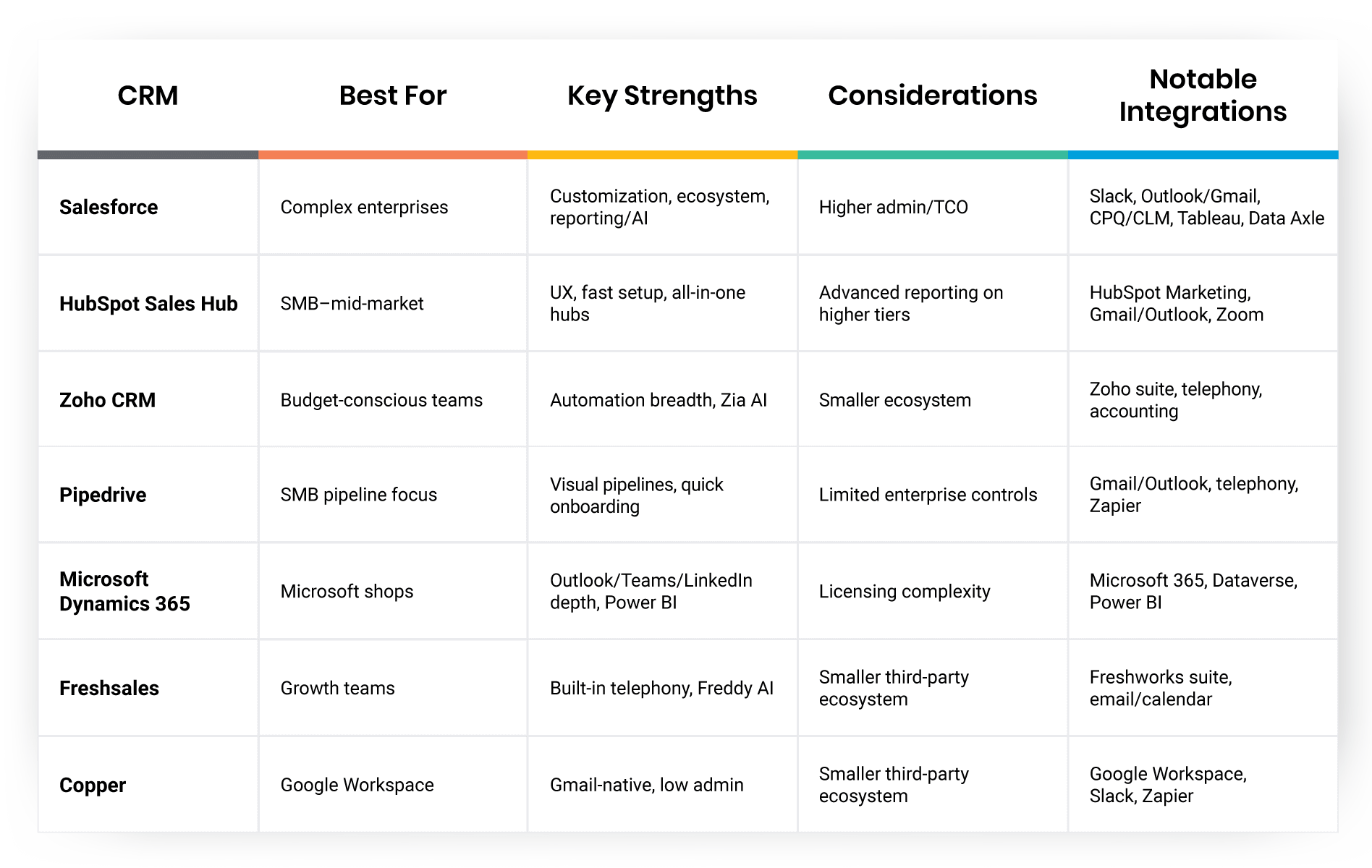
How to use this list: Treat these as starting points for your short list of the best CRMs 2026. Match each vendor’s strengths to your Section 3 criteria, and then run a hands-on pilot with your data and workflows before making the call.
How to Implement a New CRM Without Disrupting Sales
Rolling out a new CRM is a high-impact project, but it doesn’t have to come with disruption. Whether you’re a growing team evaluating the best CRMs for small business or a scaling org upgrading platforms, a thoughtful implementation ensures smoother adoption and faster ROI.
Here’s how to roll out your CRM with confidence and keep your sales engine running at full speed:
- Get clear on what success looks like. Before you worry about features or fields, align stakeholders on business outcomes. Is your priority faster follow-up? Better forecast accuracy? Cleaner handoffs between teams? Define a short list of success metrics and use those to guide every decision.
- Start with clean, usable data. Audit your current CRM or spreadsheets for duplicate records, outdated contacts, and inconsistent field values. Standardize fields like job title, company size, industry, and deal stages. Decide what to keep, archive, or clean up before the move. Run a test migration in a sandbox environment to surface mapping issues. Freeze updates 24–48 hours before the full migration and prepare a clean rollback backup just in case.
- Involve your team early. Include end users—SDRs, AEs, sales ops, and even customer success—during configuration and pilot phases. Let them weigh in on pipeline stages, task flows, and data views. The more they help shape the system, the more likely they’ll use it daily.
- Train for habits, not just features. CRM training should focus on building consistent habits that support data hygiene and better selling. Structure training by role (SDR vs. AE vs. Manager) and use real examples from your pipeline to show how and when to update deals, assign tasks, or log notes. Use a mix of live sessions, short videos, and in-app tooltips. Create quick-reference guides and cheat sheets. Appoint “CRM champions” across teams to offer peer support. Reinforce habits during team meetings and 1:1 coaching.
- Pilot first, then scale. Run a 2–4 week pilot with a small, cross-functional team. Focus on testing workflows, identifying friction points, and collecting feedback. Use what you learn to refine the broader rollout and to build a handful of internal champions who can advocate for adoption.
- Monitor adoption and performance. Pay close attention to how often users log in, whether they’re regularly updating pipeline data, and how accurate their deal stages and close dates are. If forecast accuracy improves and manual admin time goes down, you’re on the right track. Compare performance before and after rollout to get a clear picture of what’s working—and what still needs tuning. Use these insights to guide additional training, simplify processes, or fine-tune automations.
- Optimize as you go. After the first few months, revisit your configuration and workflows. Remove unused fields, update automations, and tweak dashboards to reflect new priorities. Continue adding integrations in phases once your core system is stable and trusted. Keep listening to users, tracking performance, and making incremental improvements. The best CRM platforms are designed to grow with you, but only if you keep evolving with them.
With the right process, even complex rollouts can feel straightforward. And once the CRM is fully adopted, your team gets back time, gains visibility, and builds momentum—exactly what the top CRM companies design their platforms to support.
Next up: Let’s explore how CRM integrations and add-ons can extend your platform’s value across your entire revenue tech stack.
How to Use Integrations & Add-Ons to Boost Productivity
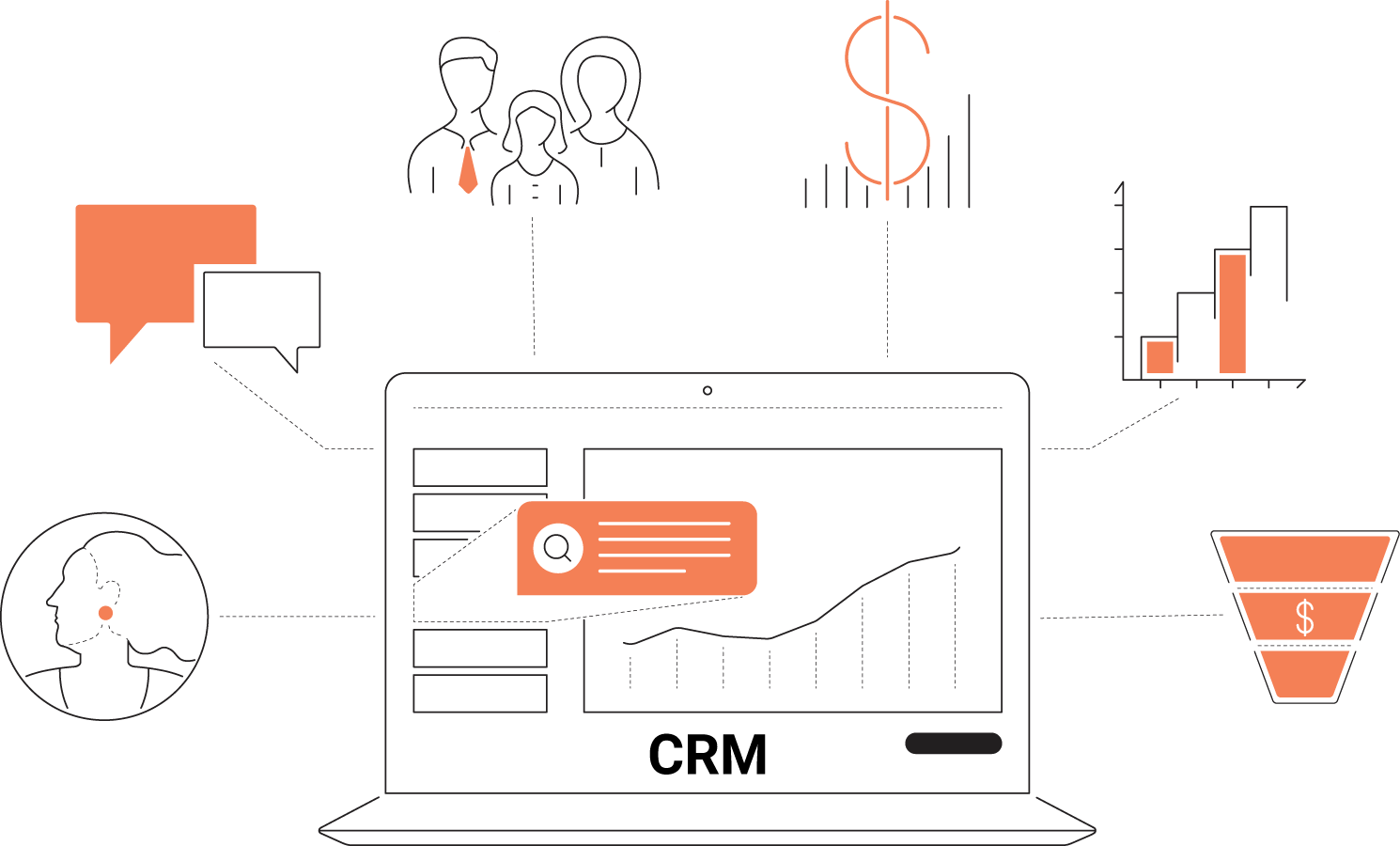
The real power of a CRM comes from how well it connects with the tools your team already uses. The best CRM platforms act as the command center for your entire revenue operation, keeping marketing, sales, service, and finance in sync without endless data entry.
- Marketing and outreach: Link your CRM to marketing automation tools so qualified leads, campaign engagement, and email interactions flow directly into the pipeline. This keeps your reps focused on prospects that are actually ready to buy.
- Quoting and deal management: Integrate CPQ, proposal, and e‑signature apps to cut down on admin time. When a quote is signed, the CRM should automatically update the deal stage and trigger next steps for onboarding or billing.
- Customer success and support: Connect your support or success platform so every account record shows ticket history, usage data, and renewal dates. When sales and success share visibility, handoffs are smoother and retention improves.
- Communication and collaboration: Sync telephony, chat, and calendar apps to capture every customer interaction. Click‑to‑call, automatic note logging, and meeting summaries help your team keep context without jumping between tabs.
- Data and enrichment: Pull in company intelligence and contact data from sources like Data Axle to keep lead lists fresh and precise. Automated enrichment fills gaps in firmographics, giving your reps a complete picture before outreach.
- Finance and reporting: Connecting ERP or accounting tools unifies revenue reporting. Closed deals can instantly trigger invoice creation or subscription setup with no manual updates required.
- Why APIs Matter: A flexible open API ensures your CRM can evolve with your tech stack. APIs and webhooks let you build custom integrations, automate workflows, and move data between systems securely and in real time. Whether you’re connecting marketing platforms or homegrown analytics dashboards, an API‑friendly CRM future‑proofs your setup and keeps you aligned with the top CRM companies driving innovation.
Next, we’ll look at emerging AI and automation trends that help sales teams take these integrations even further—boosting speed, accuracy, and revenue predictability.
Advanced Trends in B2B CRMs
AI has moved from buzzword to everyday teammate. The best CRM platforms now weave intelligence into every step of the sales cycle, helping leaders forecast with confidence and reps work smarter, faster.
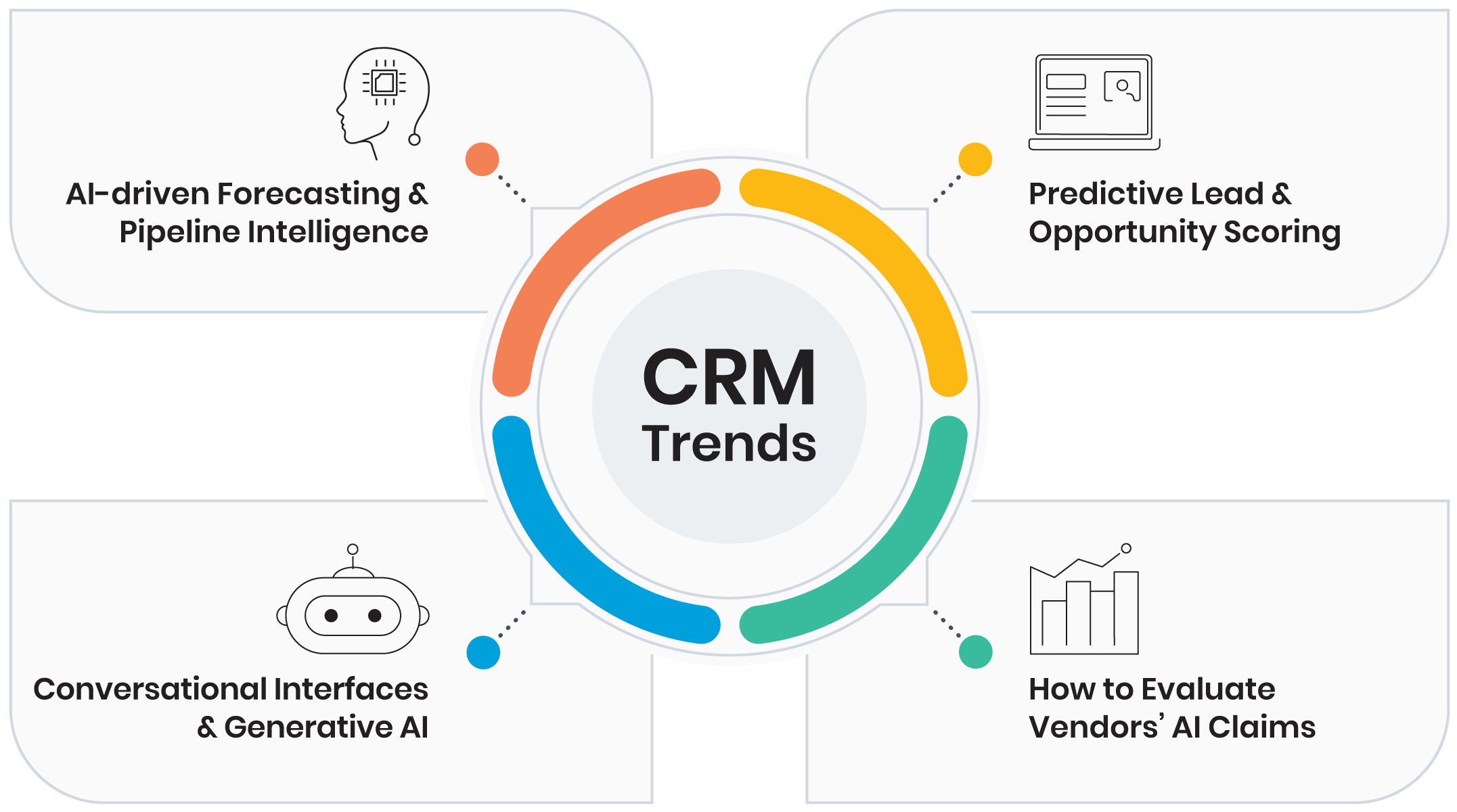
- AI-driven Forecasting & Pipeline Intelligence
Modern CRMs analyze historical performance, current deal activity, and rep behavior to predict outcomes by stage and segment. Expect early risk alerts on slipping opportunities, coverage recommendations to hit target, and scenario modeling that answers, “What happens if we add 15% more pipeline in Mid-Market this quarter?” - Predictive Lead & Opportunity Scoring
Signals from intent data, email engagement, firmographics, and past wins roll up into prioritized queues. Reps get a ranked list with reasons so follow-ups land where they’ll matter most. Managers see which campaigns and territories produce the highest-quality pipeline. - Conversational Interfaces & Generative AI
Chat with your CRM to log notes, update stages, and create tasks. Auto-generated call summaries capture next steps and objections; smart email drafting turns deal context into personalized outreach and proposals. As usage grows, the system learns your tone, templates, and playbooks, making every touch more consistent. - How to Evaluate Vendors’ AI Claims: Ask for clear explanations behind scores and forecasts, admin controls for data access, and guardrails for content generation. Look for continuous learning from your win/loss data, not just generic models.
Up next: we’ll turn these trends into an actionable plan with key takeaways and a quick checklist to help you choose and roll out a top CRM with minimal friction.
Key Takeaways & Action Plan
Selecting the right CRM goes beyond feature lists. Put your focus on empowering your sales team to close deals faster, forecast with greater accuracy, and drive consistent growth. Whether you’re refining your shortlist or preparing for implementation, the action plan below outlines the steps that will help you move forward with clarity and momentum.
- Clarify your goals.
Get alignment across sales, marketing, and leadership. Focus on measurable outcomes like faster cycle times, higher conversion rates, cleaner forecasts, or stronger customer retention. - Map your requirements.
Identify the must-haves for your team, such as custom pipelines, automation, AI insights, mobile access, integration depth, security standards, and reporting flexibility. Use these to evaluate the platforms, not just the pitch decks. - Shortlist smart.
Compare 3–5 platforms that match your sales motion. Include a mix of enterprise-ready leaders and more complex CRMs for fast-growing or leaner teams. Prioritize solutions that solve today’s needs and scale for tomorrow. - Score the experience.
Run a structured pilot. Test with real data, real users, and real workflows. Score vendors based on ease of use, feature fit, support responsiveness, and post-sales enablement. - Plan your rollout.
Define a phased rollout strategy with streamlined data migration, role-based training, and adoption metrics. Make time for feedback loops and iteration before full-scale deployment. - Measure and improve.
Track the metrics that matter most to your business. Use dashboards to monitor usage and performance, and revisit your workflows quarterly to keep them aligned with evolving goals.
Grab the Free Checklist
Looking for a side-by-side comparison tool you can share with stakeholders? Download the B2B CRM Comparison Checklist, a free, editable worksheet that helps you rate the top options based on features, TCO, integrations, and adoption support. Perfect for evaluating the CRM top companies and finding the best fit for your team.
Try Salesgenie today to see how you can integrate our tools into your CRM.
FAQs
Start with tools that are quick to set up and easy to learn. Popular short-list picks include Pipedrive, HubSpot Sales Hub (Starter/Pro), Copper (great for Google Workspace), and Zoho CRM. Look for visual pipelines, basic automation, reliable email/calendar sync, and clear upgrade paths as you grow. For more options, see our guide to the best CRMs for B2B sales.
Plan for two buckets: (1) licenses by user and tier, and (2) total cost of ownership, including implementation, data migration, training, admin time, integrations, and any add-ons (AI, CPQ, storage). Ask each vendor for an all-in Year 1 and Year 2 estimate so you can compare apples to apples across the CRM top companies.
Teams often see early wins once clean data, basic automations, and role-based dashboards are live, typically within the first quarter after go-live. Bigger gains arrive as adoption deepens: higher stage conversion, shorter cycle times, and more accurate forecasts. Your timeline depends on data hygiene, training quality, and leadership follow-through.
A B2B CRM serves as the system of record for accounts, contacts, activities, deals, and forecasts. Sales enablement platforms focus on content, coaching, playbooks, call recording/analysis, and rep readiness. They work best together: CRM data shows what’s happening; enablement tools help improve how reps execute.